
Adjust Bot Settings From AstraBitTrade
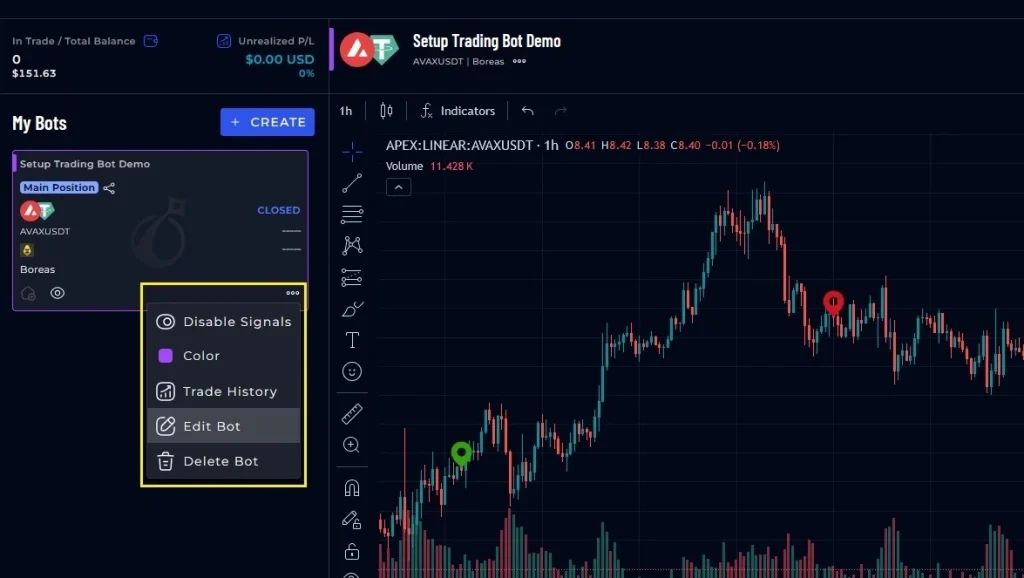
- Navigate to trade.astrabit.io and find the trading bot you would like to edit.
- Select the 3 dots in the lower right corner, and then select “Edit Bot.”
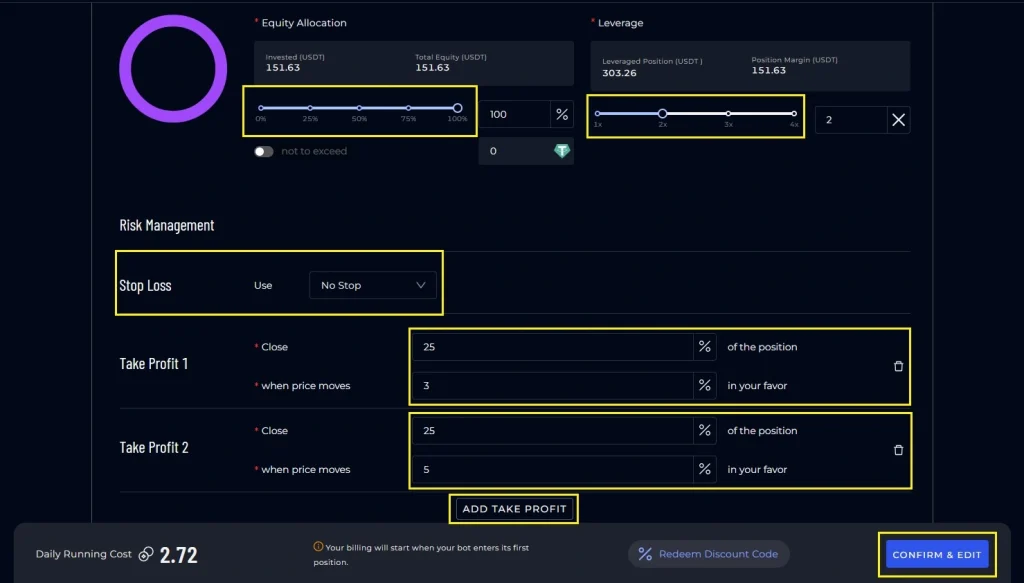
- This will open the bot wizard, and will allow you to edit these settings:
- Add a new API or update API information
- Name of bot
- Equity Allocation
- Leverage
- Adjust Stop Loss settings or add one
- Adjust Take Profit settings or add additional
- After editing your bot, click “Confirm & Edit.”
- You trading bot will take these new settings and apply them to trades moving forward.
Adjust Bot Settings From Nexus Dashboard
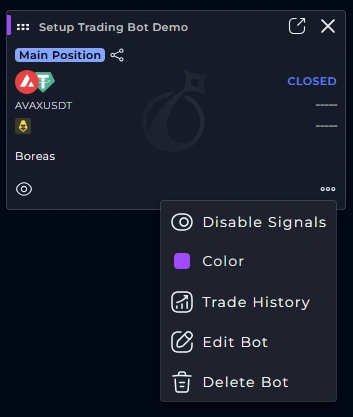
- Navigate to nexus.astrabit.io and find the trading bot you would like to edit.
- Select the 3 dots in the lower right corner, and then select “Edit Bot.”
- This will open the bot wizard, and will allow you to edit these settings:
- Add a new API or update API information
- Name of bot
- Equity Allocation
- Leverage
- Adjust Stop Loss settings or add one
- Adjust Take Profit settings or add additional
- After editing your bot, click “Confirm & Edit.”
- You trading bot will take these new settings and apply them to trades moving forward.
What Happens After You Adjust Bot Settings?
- Updated settings apply to future trades only.
- Open positions are not automatically modified.
- Changes take effect after clicking Confirm & Edit.
- You can reopen the bot settings at any time before the next trade executes.
Frequently Asked Questions (FAQs)
Do changes to bot settings affect trades that are already open?
No. Updated bot settings apply to future trades only. Existing open positions are not automatically modified.
Can I adjust bot settings while a bot is running?
Yes. You can edit bot settings while a bot is running. Changes take effect after you save them and apply to new trades going forward.
Which bot settings can I adjust?
You can adjust settings such as equity allocation, leverage, and risk management options, depending on the bot configuration available in your dashboard.
Which bot settings can I adjust?
Confirm you are viewing the correct bot in the Trade section or Nexus Dashboard. Refresh the page and reopen the bot menu. If the option still does not appear, contact support.
How can I confirm my changes were saved?
After saving, reopen the bot settings to verify the updated values are displayed. You may also refresh the dashboard to confirm the latest settings are loaded.
Related Articles
- How to Create a Trading Bot
- How to Pause or Stop a Trading Bot
- What Is Leverage?
- What Is Risk Management?