
Personal Strategies · Help Center
Connect a Personal Trading Strategy to AstraBit
Create an AstraBit bot driven by your own strategy via webhooks — TradingView alerts or signals from code you’ve written in any language. Anything that can send JSON to an endpoint works. This guide covers bot setup, signal connection, alert payloads, and testing.
If your platform can send a webhook, it can drive an AstraBit bot. Technical setup guide only; not trading advice.
Before You Begin
Indicator vs. Strategy Scripts
If you’re using TradingView, there’s a functional difference between the two script types — and it determines which endpoint you must use.
Strategy Scripts
A Strategy offers a backtest so you can see the trades and results that would’ve been taken — but by design it tends to repaint and give false signals if not coded correctly, because TradingView’s backtesting engine directly generates the signals. Strategies MUST use the Unified Signal endpoint on AstraBit.
Indicator Scripts
An Indicator should not repaint and does have the ability to create customized alerts via alertcondition() — the recommended approach for clean signals.
DCA Not Compatible
DCA bots & strategies are currently not compatible with the Unified Signal endpoint.
JSON Only, Always Valid
Alert messages must contain a JSON-formatted payload and no other text to be parsed by AstraBit. Validate your formatting with a tool like jsonlint.com.
Bot Setup
Create Your
Personal-Strategy Bot
Five steps to a bot that listens for your signals.
How Authentication Works
- Your bot gets Signal Notification URLs (webhook endpoints)
- Every request must include your secret phrase in the JSON body
- Received signals appear in your bot’s Signal Log
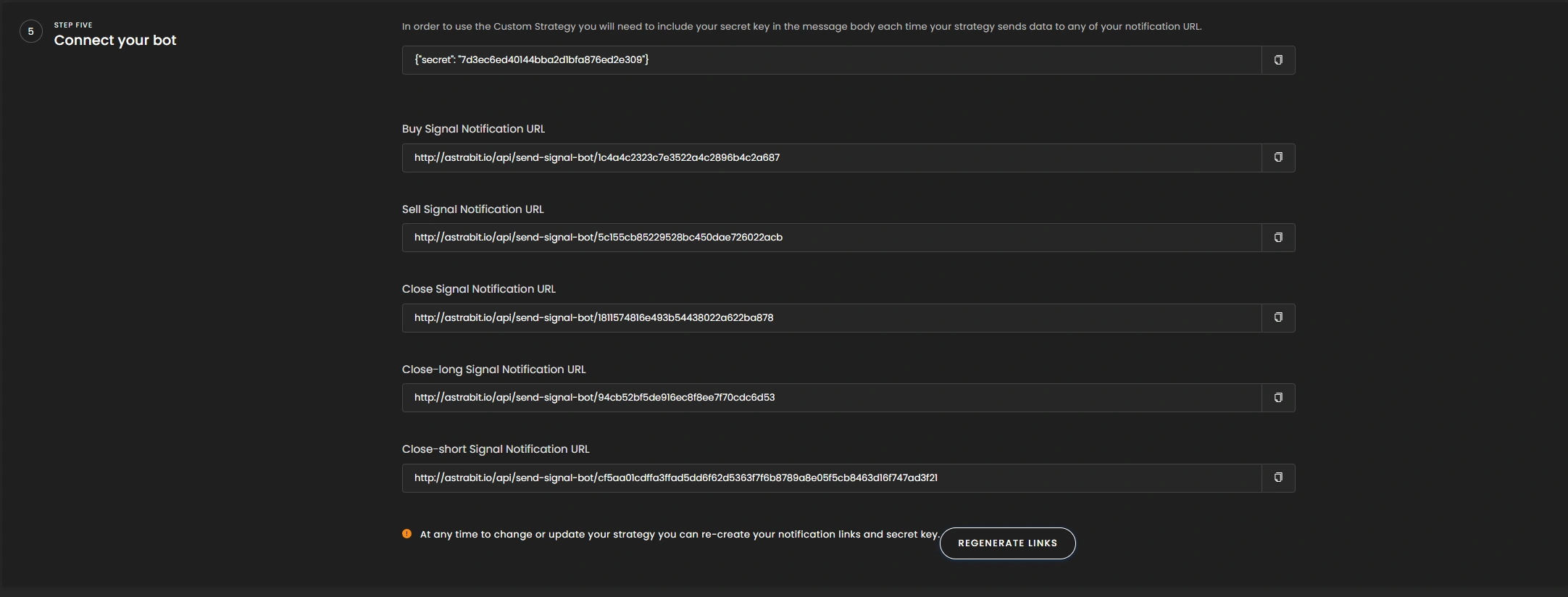
You can revisit or regenerate your URLs anytime via Edit Bot → Step Five (Connect your bots).
Create a Trading Bot
- Create a trading bot and go to Step One (Strategy).
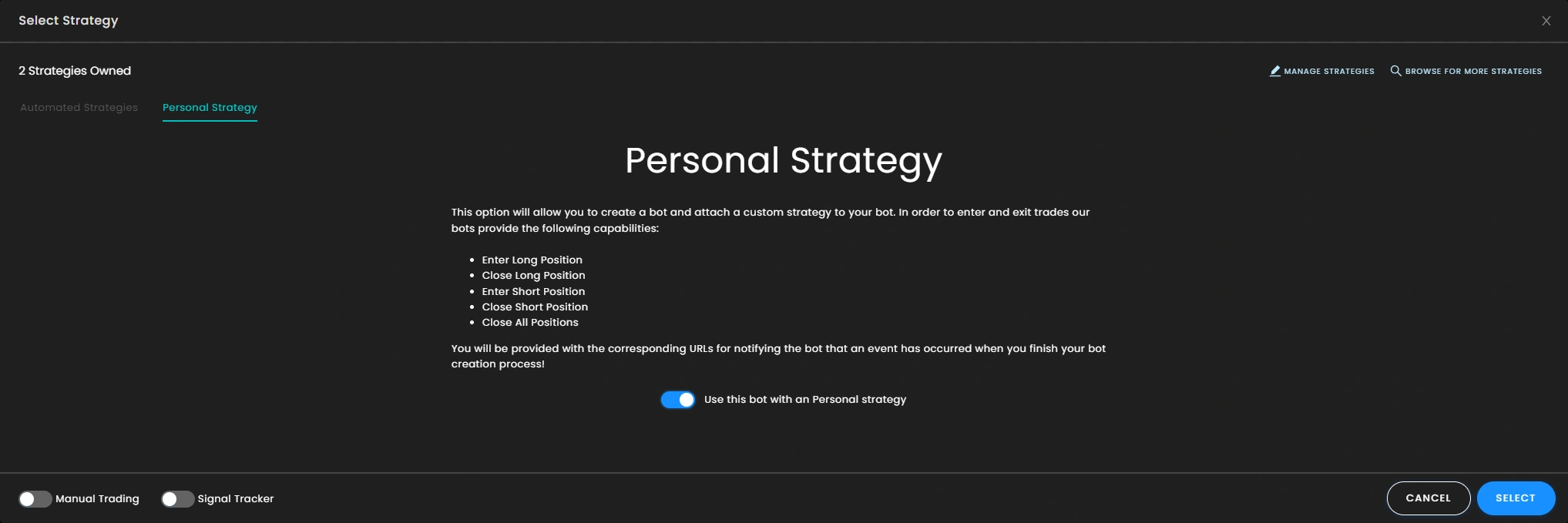
Select the Personal Strategy Tab
- Select the Personal Strategy tab.
- Enable the toggle to use the bot with a personal strategy.
Configure the Rest of Your Bot
- Fill in your bot’s allocations, type, and risk management settings.
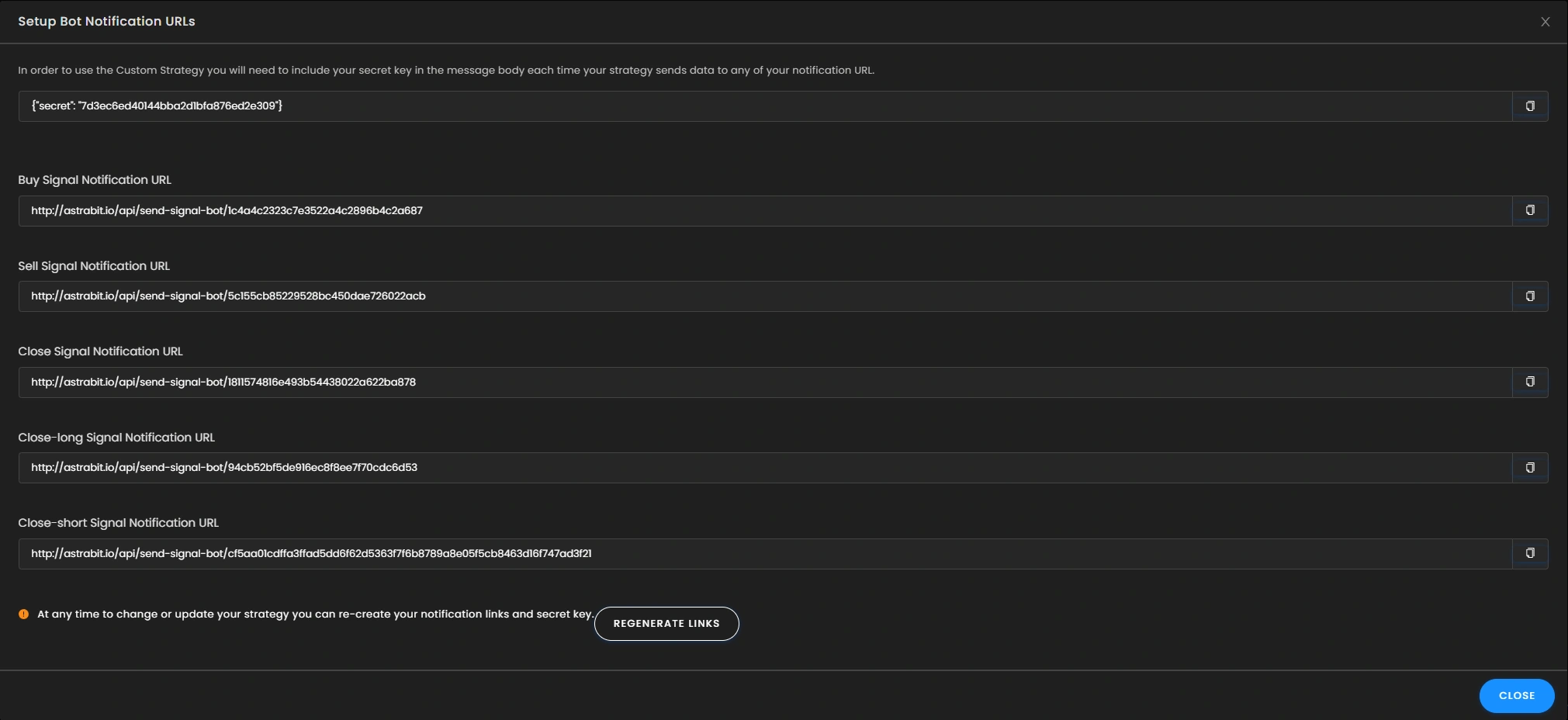
Save Your Signal URLs & Secret Phrase
- After creation, a window shows your bot’s Signal Notification URLs and your secret phrase used to authenticate all requests.
Revisit or Regenerate Anytime
- Go to Edit Bot at any time to revisit and/or regenerate your Signal Notification URLs on Step Five (Connect your bots).
Connecting Signals
Wire Up Your Webhooks
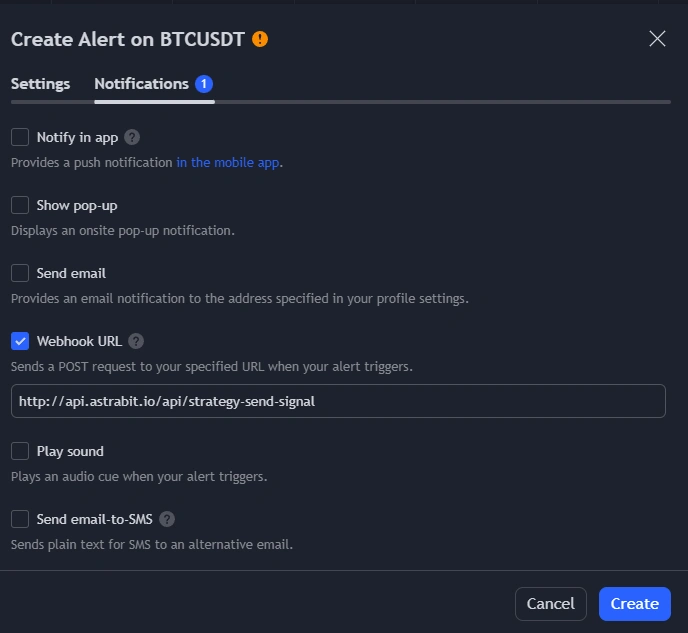
The URLs are webhook endpoints that expect the body message to contain JSON with your authentication secret:
{ "secret": "{YOUR_SECRET_PHRASE}" }
Alert Conditions Reset on Update
Updating an alert’s Condition resets the next dropdown to the default first item. If you update your indicator settings and want to update the alert with them, you must re-set the condition trigger afterward. Example: the default trigger is “Long Close” — when updating a BTC Long alert and BTC Short alert, change “Long Close” to “Long Open” for the Long alert and to “Short Open” for the Short alert.
TradingView Unified Signal Alert Setup
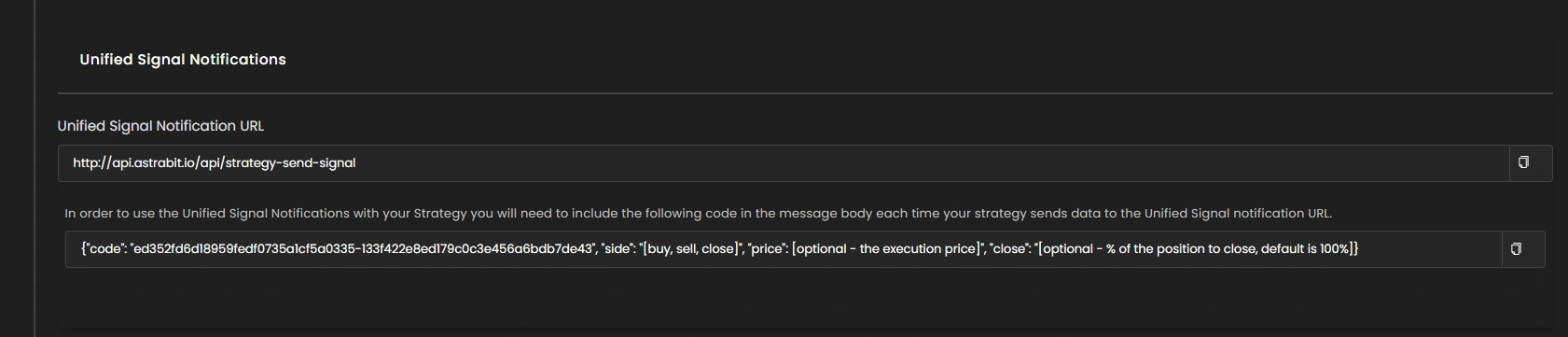
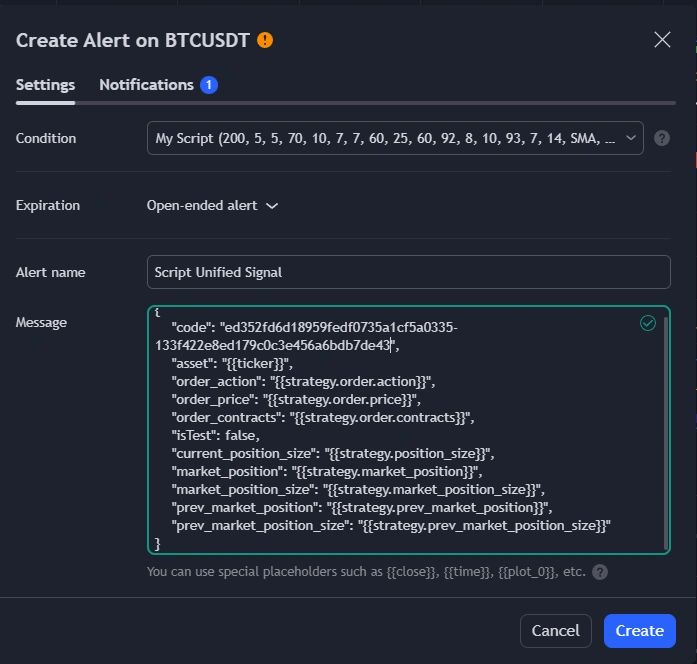
For Strategy scripts, use the Unified Signal endpoint with this payload:
{
    "code": "SOME_CODE_HERE",
    "asset": "{{ticker}}",
    "order_action": "{{strategy.order.action}}",
    "order_price": "{{strategy.order.price}}",
    "order_contracts": "{{strategy.order.contracts}}",
    "isTest": false,
    "current_position_size": "{{strategy.position_size}}",
    "market_position": "{{strategy.market_position}}",
    "market_position_size": "{{strategy.market_position_size}}",
    "prev_market_position": "{{strategy.prev_market_position}}",
    "prev_market_position_size": "{{strategy.prev_market_position_size}}"
}
TradingView Custom Alert Signal Setup

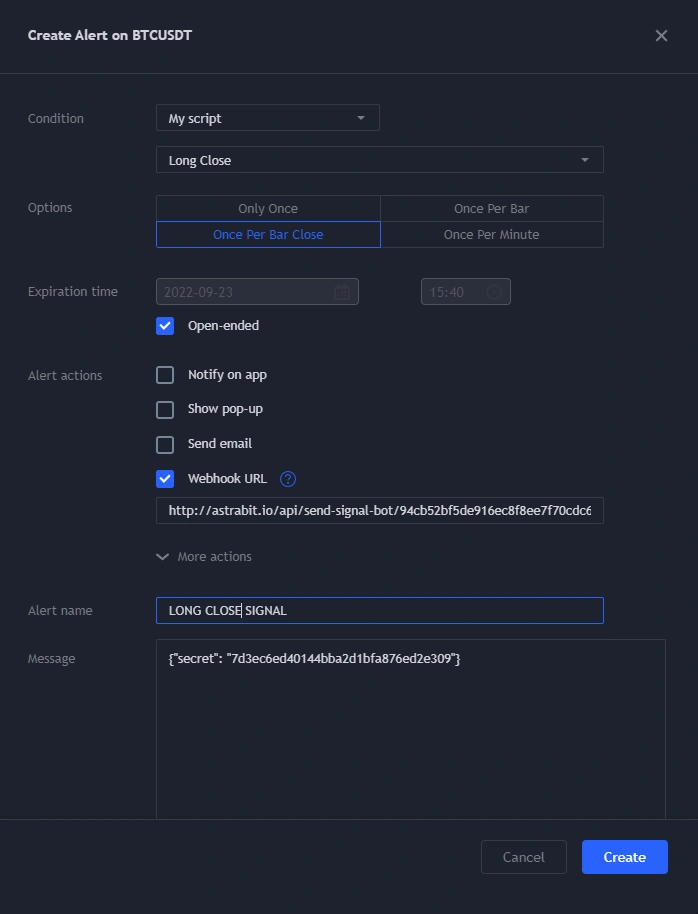
Example fields:
{
    "secret": "YOUR_SECRET_KEY_WILL_BE_HERE",
    "order_price": "{{close}}",
    "close": "50"
}
TradingView Manual Alert
Anatomy of a Signal Alert
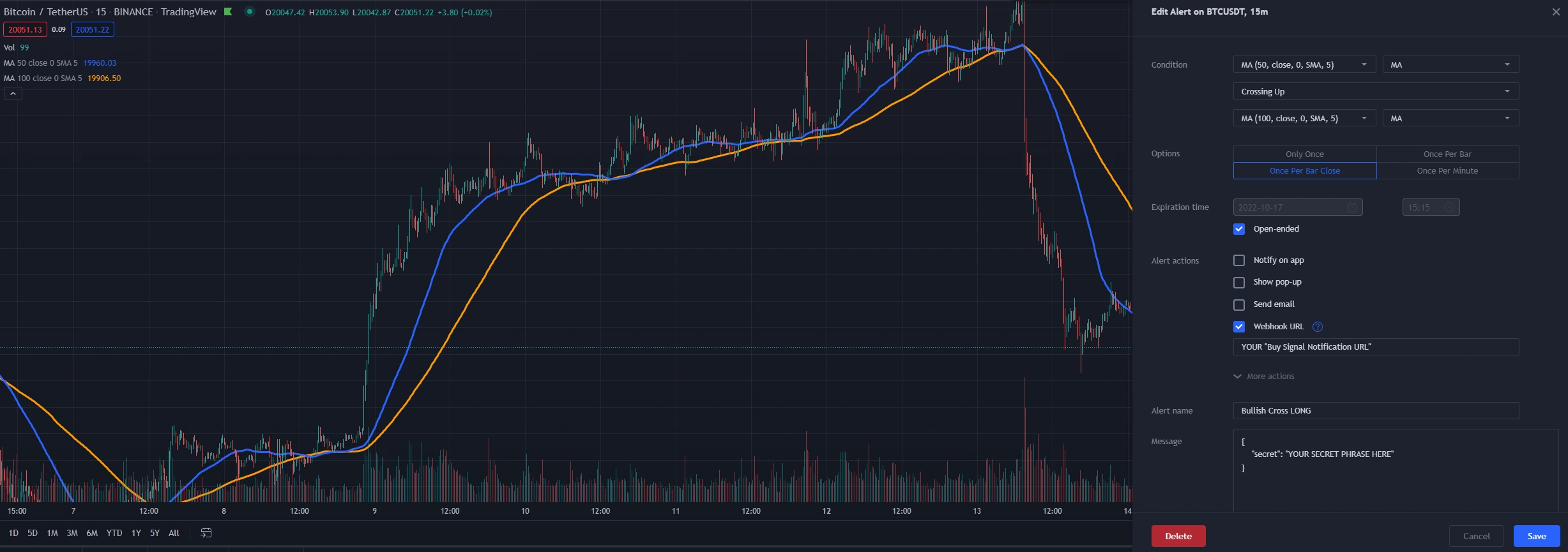
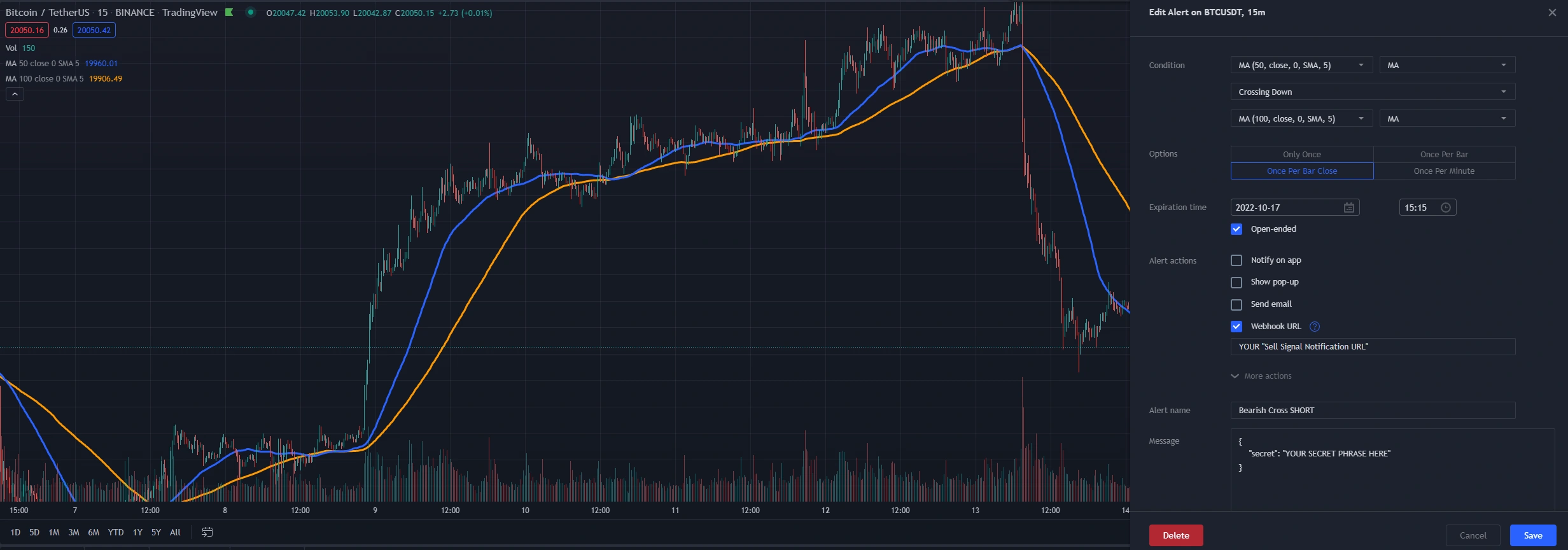
alertcondition() are recommended. See the Pine Script v5 documentation.Once Per Bar Close waits for candle-close confirmation before sending; Once Per Bar sends during the candle — useful for Take Profit or Stop Loss level signals.Unified Signals — Required Values
{
    "code": "STRATEGY_CODE_HERE",
    "asset": "{{ticker}}",
    "price": "{{close}}",
    "order_action": "{{strategy.order.action}}",
    "order_price": "{{strategy.order.price}}",
    "order_contracts": "{{strategy.order.contracts}}",
    "isTest": false,
    "current_position_size": "{{strategy.position_size}}",
    "market_position": "{{strategy.market_position}}",
    "market_position_size": "{{strategy.market_position_size}}",
    "prev_market_position": "{{strategy.prev_market_position}}",
    "prev_market_position_size": "{{strategy.prev_market_position_size}}"
}
Custom-Coded Strategies in Any Language
Not using TradingView? If your code can send an HTTP request, it can send signals. Python, JavaScript, C#, Go — the endpoint doesn’t care what wrote the request, only that the body is valid JSON with your secret. The same rules apply:
Testing Signals
Verify Before You Trade
Confirm your signal setup is authenticating and being received correctly with a one-off test alert from TradingView:
This sends a single test signal whenever it’s saved — or each time it’s enabled from the TradingView alerts sidebar. Then check your personal bot’s Signal Log to confirm the close signal was received by AstraBit.
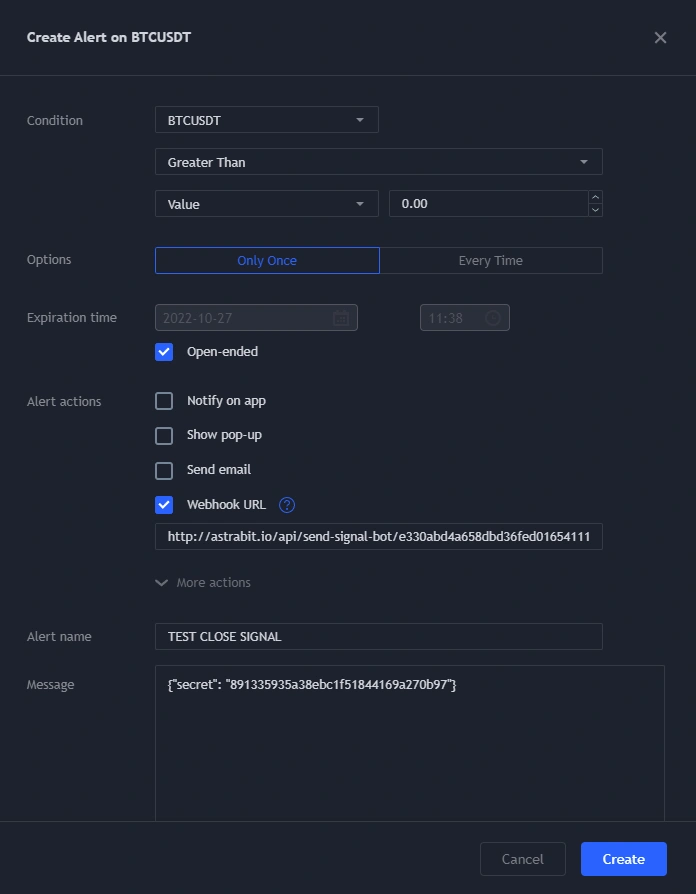
Once the Test Lands
You know your signals can send and authenticate. The Alert Message is correct and can be copied and pasted to all other alerts for that strategy.
Quick Recap
Three Rules for Clean Signals
JSON Only
The alert message contains a valid JSON payload and nothing else.
Secret in Every Request
Every webhook call authenticates with your secret phrase (or strategy code for Unified Signals).
Strategies Need Unified
TradingView Strategy scripts must use the Unified Signal endpoint — and DCA bots aren’t compatible with it.
Need help along the way?
If you experience any problems, contact support by email or submit a ticket through Discord.
