
How to Pause/Disable a Bot:
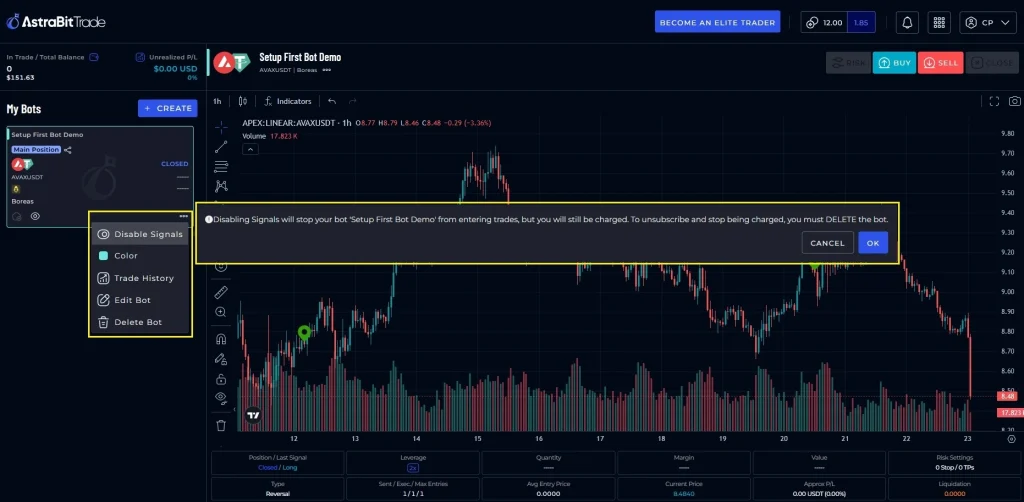
- Under AstraBitTrade bot list, select the bot you wish to disable.
- Click the 3 dots in the lower right corner of the bot card.
- Select “Disable Signals.”
- Review the warning that states, “Disabling Signals will stop your bot ‘[Bot Name]’ from entering trades, but you will still be charged. To unsubscribe and stop being charged, you must DELETE the bot.”
- Please Note: you will still be charged but your bot will not execute trades.
How to Stop/Delete a Bot:
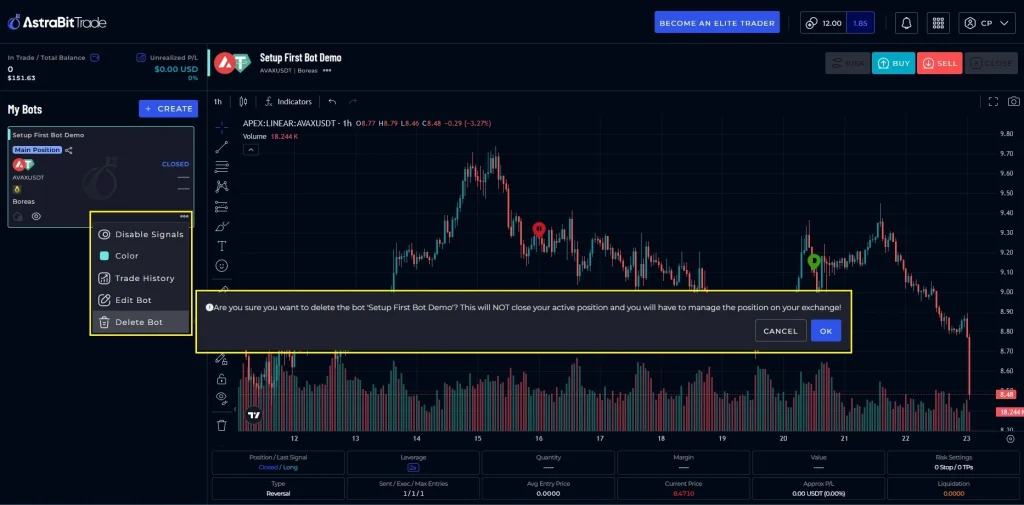
- Under AstraBitTrade bot list, select the bot you wish to disable.
- Click the 3 dots in the lower right corner of the bot card.
- Select “Delete Bot.”
- Review the warning that states, “Are you sure you want to delete the bot ‘[Bot Name]’? This will NOT close your active position and you will have to manage the position on your exchange!”
- This will remove your bot completely and you will not be charged following the next period.
- Please Note:
- Your strategy is still available.
- To start trading again, you will need to set up a new trading bot.
- Your trading history and PnL will not transfer to a new bot if you delete one and then create another bot using the same strategy.
- You can find the bot history and trade performance in the Codex section.
What Happens After You Pause or Delete a Bot?
If you pause a bot:
- No new trades will be opened.
- Existing open positions remain active.
- You can resume the bot at any time.
If you delete a bot:
- No new trades will be opened.
- Open positions are not automatically closed.
- You will need to handle trades on the exchange.
- The bot configuration cannot be restored.
- Historical trade data remains accessible in the Codex section.
Related Articles
- How to Create a Trading Bot
- How to Adjust Bot Settings
- Understanding Bot Signals
- How to Monitor Active Positions