
BingX
Trading Bot.
Set the Rules.
Let It Run.
Connect your BingX perps account to AstraBit with an API key and automate your trading with rule-based execution — marketplace strategies, manual control from one dashboard, or your own code. Your funds never leave BingX.
AstraBit is a U.S. registered broker-dealer and FINRA member firm. CRD# 331540.
What Is a BingX Trading Bot?
A BingX trading bot is software that places and manages perpetual futures trades on BingX automatically, following rules you define — instead of you entering every order by hand.
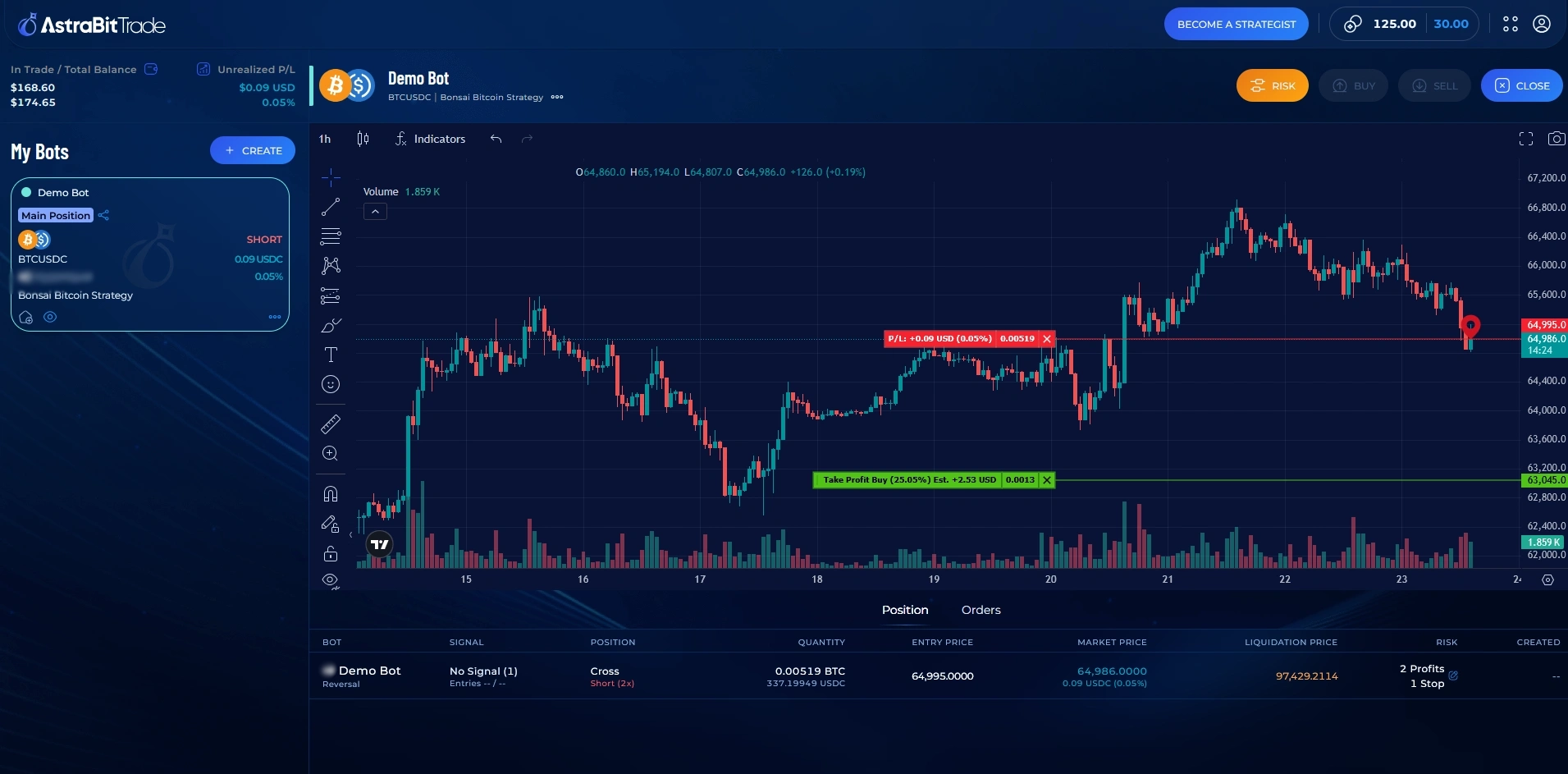
Your BingX bot is part of AstraBit’s rule-based trading bots, all managed from one dashboard. It runs through an API key you create on BingX — funds stay in your BingX account, and withdrawal and transfer permissions stay disabled on the key. Monitor positions, orders, and P&L from the AstraBit dashboard.
Three Ways to Trade BingX with AstraBit
One API connection. Three ways to use it — pick the workflow that fits how you trade.
Marketplace Strategies
Browse the AstraBit Strategy Marketplace and subscribe to a published rule set. Once linked to your BingX connection, the strategy’s signals execute on your account automatically — no coding required.
Manual Trading Dashboard
Set up a personal bot and enter or exit BingX positions directly from the AstraBit trading dashboard. Manage BingX alongside your other connected exchange accounts — charts, orders, and P&L in one place.
Bring Your Own Strategy
Already have a system? Connect a custom strategy coded in any language, or send signals straight from TradingView via webhook. AstraBit handles execution on BingX.
How to Connect BingX to AstraBit
BingX is a centralized exchange, so setup is quick — create an API key on BingX and add it to AstraBit. Five steps, start to finish.
-
Create or Log In to Your BingX Account
New to BingX? Sign up through AstraBit’s partner link to become Freemium-eligible. Complete identity verification (KYC) — BingX requires it before you can create API keys.
-
Open API Management
Click your profile icon in the top-right corner of BingX, select API Management, then click Create API.
-
Set the Right Permissions
Enable Read and Perpetual Futures Trading. Leave Withdrawal, Transfer, and Universal Transfer disabled — AstraBit never needs them.
-
Verify & Copy Your Keys
Complete BingX’s security verification (SMS, email, or authenticator), then copy your API Key and Secret Key. The Secret Key is shown only once — store it somewhere safe.
-
Connect in AstraBit & Create Your Bot
In the Nexus dashboard, choose Connect Exchange → BingX, select Perpetual Futures as the contract type, leave position and margin on auto-sync, paste your keys, and connect. Then create your trading bot and link it to a strategy.
Before You Connect
- Identity verification (KYC) completed on BingX
- At least $100 of base currency (USDT or USDC) in your Futures wallet
- API permissions: Read + Perpetual Futures Trading only — withdrawal and transfer stay off
- Optional: add AstraBit’s trusted IPs to your BingX API whitelist
Full Setup Guide with Screenshots
Every step above is documented in detail — API creation, permissions, security verification, and connecting to Nexus.
Read the Connection GuideWhat to Consider First
Automation doesn’t change the fundamentals. Here’s what to understand about BingX and AstraBit’s integration before you start.
Perpetuals Only — No Spot
AstraBit’s BingX integration supports perpetual futures. Spot trading on BingX isn’t available through AstraBit, so plan your funds around your Futures wallet.
Leverage Cuts Both Ways
Perpetual futures are leveraged instruments. Trading them — automated or not — involves a significant risk of loss and may not be suitable for all investors. A bot follows rules; it does not guarantee outcomes.
$100 Minimum to Connect
BingX requires a minimum balance of at least $100 in base currency (USDT or USDC) in your Futures wallet for AstraBit to detect your balance and execute trades reliably.
BingX Is a Centralized Exchange
BingX custodies the assets in your account and requires identity verification — a different model from on-chain venues where you hold your own keys. New to the distinction? Read our guide to centralized vs. decentralized exchanges.
BingX Is Freemium-Eligible
The Freemium + Loyalty Program is how AstraBit prices the platform: there’s no subscription fee — everything is paid with AstraBit Credits, and eligible activity can earn credits back. Trade on a BingX account linked through AstraBit’s partner link and a portion of the commissions AstraBit earns may be returned to you as credits. Depending on your eligible activity, credits could be applied 1:1 toward bots and strategies and may offset some or all of your costs. Here’s how it works:
- Open your AstraBit account at no cost and earn credits for completing onboarding tasks.
- Create your BingX account through AstraBit’s partner link to make your account Freemium-eligible.
- As you trade on your linked BingX account, AstraBit converts a portion of the commissions it earns into AstraBit Credits on your account.
- Apply credits 1:1 toward eligible platform costs — bots, strategies, and more. 1 Credit = $1 USD. Credits do not expire.
- Billing starts only after your bot executes its first trade, at a transparent daily rate. Stop anytime by deleting the bot.
*AstraBit Credits are earned through eligible trading activity on affiliate-linked exchange accounts and by completing qualifying platform tasks. Credits are applied 1:1 toward eligible platform costs (1 credit = $1 USD), do not expire, are non-transferable, and have no cash value. Whether credits offset some or all of your costs depends on your activity. See the Freemium + Loyalty Program details.
Trading Bot Tiers
Every bot is priced as a simple daily rate, paid in Credits. Pick the feature set that fits your approach — and remember the rate only applies on days after your bot’s first trade.
Basic Bot
Entry-level option
- Connect to any supported exchange
- Copy trading & signals from strategies or Master Traders
- Fixed or percentage stop loss
- Up to 2 take-profit levels
- Up to 4 DCA steps
Standard Bot
Basic + additional features
- Everything in Basic
- Leverage functionality
- Fixed and trailing stop losses
- Up to 5 take-profit levels & 8 DCA steps
- One-click manual trading
- Connect your own strategies
Advanced Bot
Standard + advanced features
- Everything in Standard
- Hedging & AstraBit Stop Loss
- Up to 10 take-profit levels & 15 DCA steps
- Send signals to any bot to copy
- Religious law settings
- Fully interactive chart
Nexus Bot
Full feature set
- Everything in Advanced
- Unlimited trade triggers
- Central command bot for all others
- Master Trader bot
* Prices are paid in AstraBit Credits. 1 Credit equals $1 USD — pay with crypto or fiat. Prices may vary based on discounts. Credits earned through the Freemium + Loyalty Program apply 1:1 toward these rates. See the full feature comparison on the pricing page.
Ready to Automate Your BingX Trading?
Open your account at no cost, connect BingX via API, and put your rules to work — from the marketplace, the dashboard, or your own code.
Trading digital assets and perpetual futures is highly speculative, involves a significant risk of loss, and may not be suitable for all investors. AstraBit does not provide investment advice or trading signals, and automation does not assure profits or protect against losses.
BingX Trading Bot Questions
What is a BingX trading bot?
A BingX trading bot is software that places and manages perpetual futures trades on BingX automatically, based on rules you define. On AstraBit, the bot connects to your BingX account through an API key you create — it can follow a marketplace strategy, execute your manual orders from the AstraBit dashboard, or run a strategy you’ve built yourself.
Does AstraBit hold my BingX funds?
No. Your funds stay in your BingX account at all times. AstraBit connects through API permissions that allow trade execution only — withdrawal and transfer permissions are never enabled on the key.
Does AstraBit support BingX spot trading?
Not currently. AstraBit’s BingX integration supports perpetual futures only, using the Read and Perpetual Futures Trading API permissions. Spot trading on BingX isn’t available through AstraBit.
How does AstraBit connect to BingX?
Through an API key. Log in to BingX, open API Management, create a key with Read and Perpetual Futures Trading permissions, then paste the API Key and Secret Key into AstraBit’s Nexus dashboard. The step-by-step guide covers the full setup with screenshots.
How much does a BingX trading bot cost on AstraBit?
There’s no upfront cost to open an account. Bots are paid for with AstraBit Credits (1 credit = $1 USD) at a daily rate, and billing only begins after your bot executes its first trade. Daily rates run from 0.33 credits for a Basic bot to 0.66 for Standard and 1.33 for Advanced (roughly $10–$40 per month), with a Nexus tier (1.99) in development. If you register on BingX through AstraBit’s partner link, eligible trading activity may earn credits that could offset some or all of your costs. See the Freemium + Loyalty Program for details.
Can I use my own strategy or TradingView alerts?
Yes. You can connect a custom strategy coded in any language, or send signals from TradingView to AstraBit via webhook. AstraBit receives the signal and executes on your connected BingX account. See how to connect a custom strategy.
What do I need before connecting BingX to AstraBit?
A verified (KYC) BingX account and a minimum balance of at least $100 of base currency (USDT or USDC) in your BingX Futures wallet. Both are required for the API connection to detect your balance and execute trades properly.
Is AstraBit a regulated company?
Yes. AstraBit operates as CPT Capital, LLC, a U.S. broker-dealer registered with the SEC and a member of FINRA (CRD# 331540). You can verify our registration at FINRA BrokerCheck. Note: not all AstraBit services are broker-dealer services regulated by the SEC or FINRA.
