
Trading Bots & Strategies · Help Center
How to Set Up a Crypto Trading Bot on Astrabit
A crypto trading bot is automated software that connects to your exchange and places trades for you based on predefined rules, indicators, or signals — executing your strategy around the clock. This guide walks through creating and launching a bot on AstraBit: connecting your exchange, configuring strategy settings, and activating automated trading.
This content is provided for informational purposes only; not trading advice.
Before You Launch
What to Know First
A bot follows rules; it does not guarantee outcomes. Here’s what to have in place before you build.
What You Need
An AstraBit account, a supported exchange account, and API keys from that exchange with trading permissions enabled and withdrawals disabled for security.
Credits & Billing
Make sure you have enough AstraBit Credits to launch. Charges begin only after the bot executes its first trade, then apply daily until the bot is stopped or deleted.
Your Funds Stay Put
AstraBit does not take custody of your funds. Your assets remain on your connected exchange, and bots operate through API access with permissions you control.
Start Small, Test First
Begin with a small equity allocation, confirm the test transaction during setup, and monitor performance before increasing allocation. Trading digital assets involves significant risk.
Step-by-Step Setup
Eight Steps,
Wizard to Launch
The Create Bot wizard walks you through trading type, exchange, strategy, bot tier, and configuration.
Prerequisites Checklist
- AstraBit account with Credits available
- Exchange connected via API (trading on, withdrawals off)
- Funds in the right wallet on your exchange
Exchange-specific API instructions are linked at the bottom of this guide.
Start the Bot Creation Wizard
- Log in to your AstraBit account.
- Navigate to the Nexus dashboard.
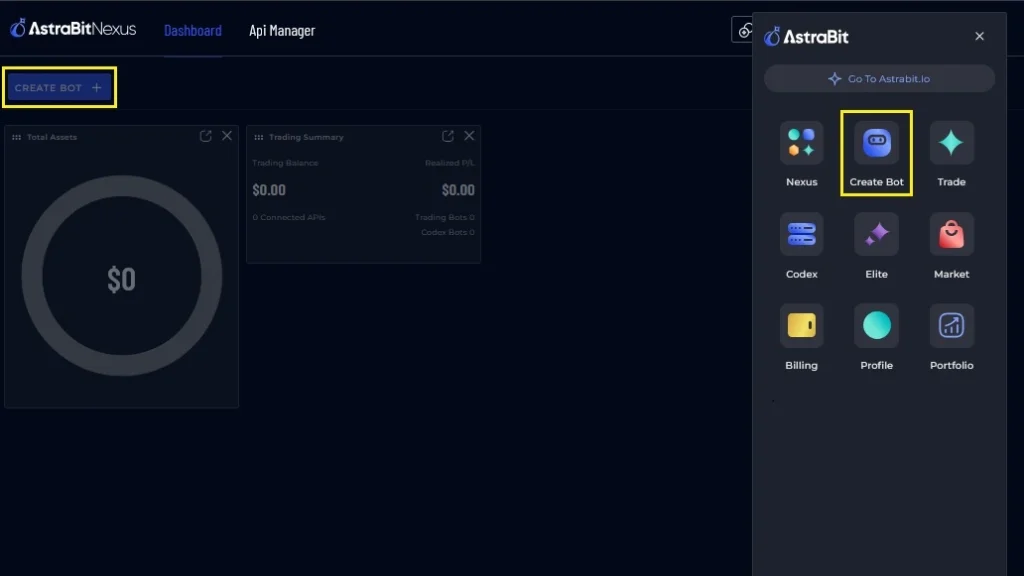
- Open the Menu and select Create Bot — or use the Create Bot button on the left-hand side.
Choose Your Trading Type
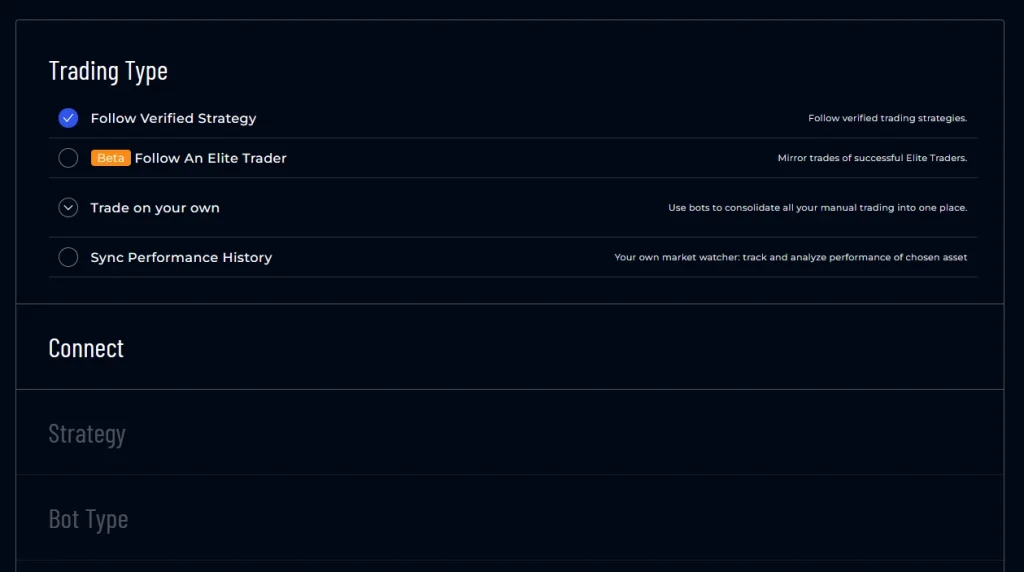
- Follow a Verified Strategy — plug-and-play strategies from vetted third-party strategists, ranging from DCA to Swing to Scalping. You’ll review strategies in full in later steps.
- Follow an Elite Trader (BETA) — AstraBit’s version of copy-trading. Applications are open for Elite Traders.
- Trade Your Own Strategy — bring your own strategy, coded in any language, web-hooked from TradingView, or traded manually via AstraBit’s dashboard.
- Sync Performance History via Codex Bot — connect APIs to Codex bots to sync trade history and use it in AstraBit Portfolio analytics.
Connect an Exchange
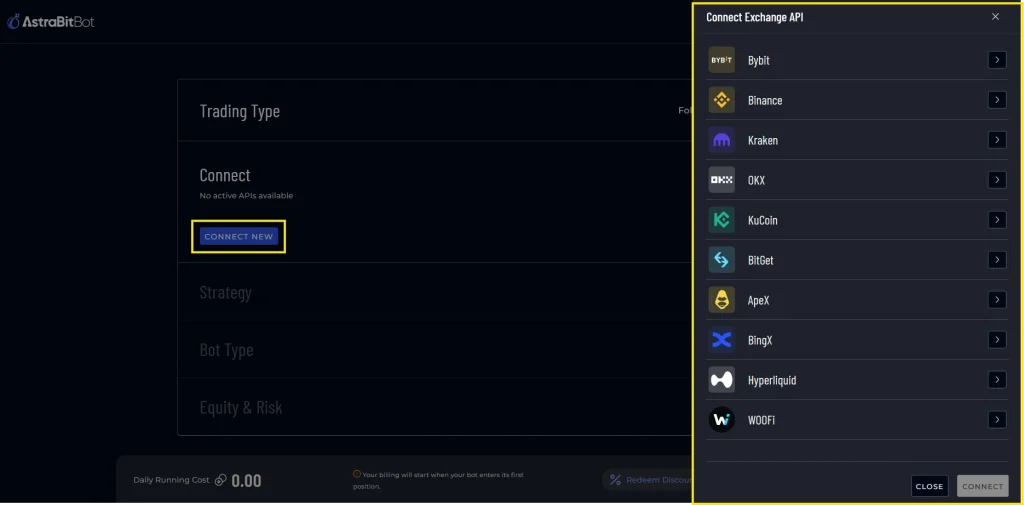
- Select Connect New exchange.
- From the pop-up, select the exchange you want to connect.
- Enter the exchange API information in the specific fields.
- Select Connect — you’ll see the new API added.
For exchange-specific instructions, see the connection guides linked at the bottom of this page.
Select Your Trading Strategy
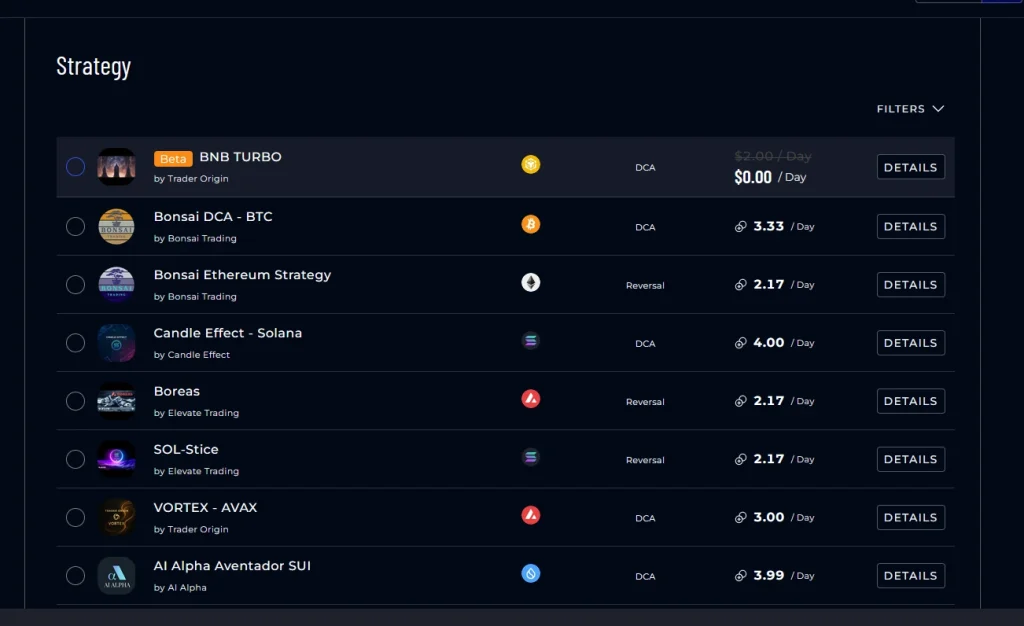
- Select the strategy of your choice — filter by Strategist, Asset, Type, and Cost.
- Click Details for additional information.
- The PnL Calculator for each strategy is also under Details.
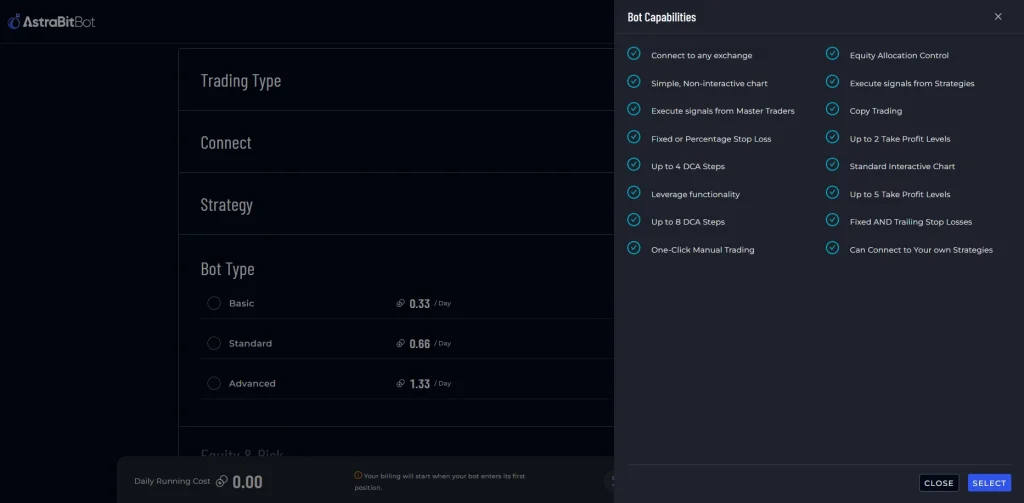
Select Your Trading Bot Type
- Choose Basic, Standard, or Advanced.
- Click Details for a list of capabilities for each tier.
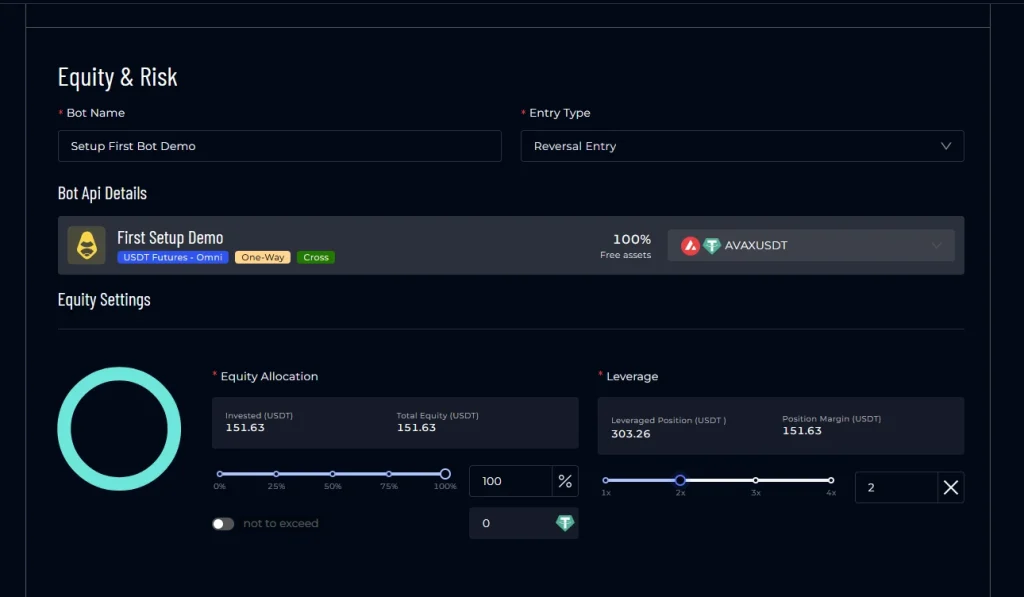
Set Up Bot Configurations
- Name your bot anything you like.
- Entry Type — based on strategy type.
- Adjust Equity Allocation — the % of funds in your account to use for each entry.
- Set a Leverage amount (optional).
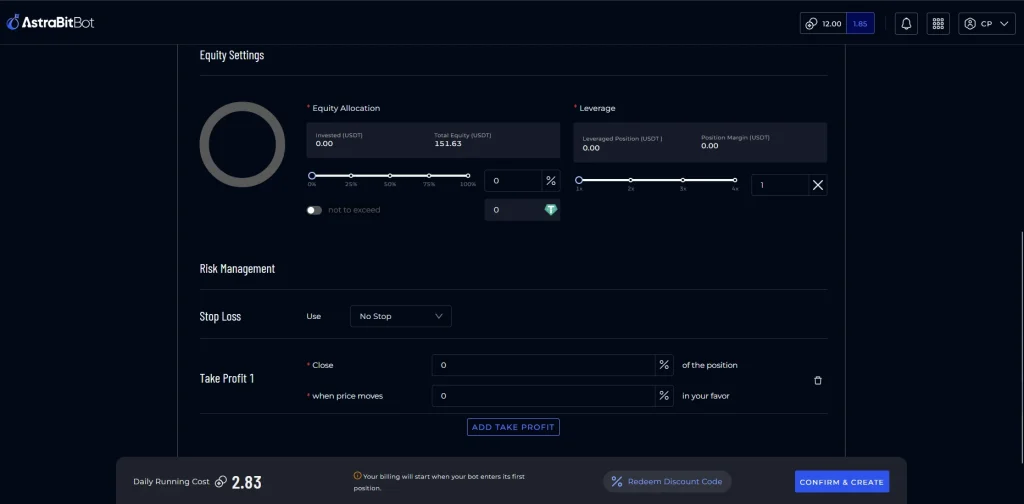
Add Risk Management (Optional)
- Set a Stop Loss (optional).
- Add a Take Profit level (optional).
- The number of Take Profit levels you can set is based on your trading bot tier.
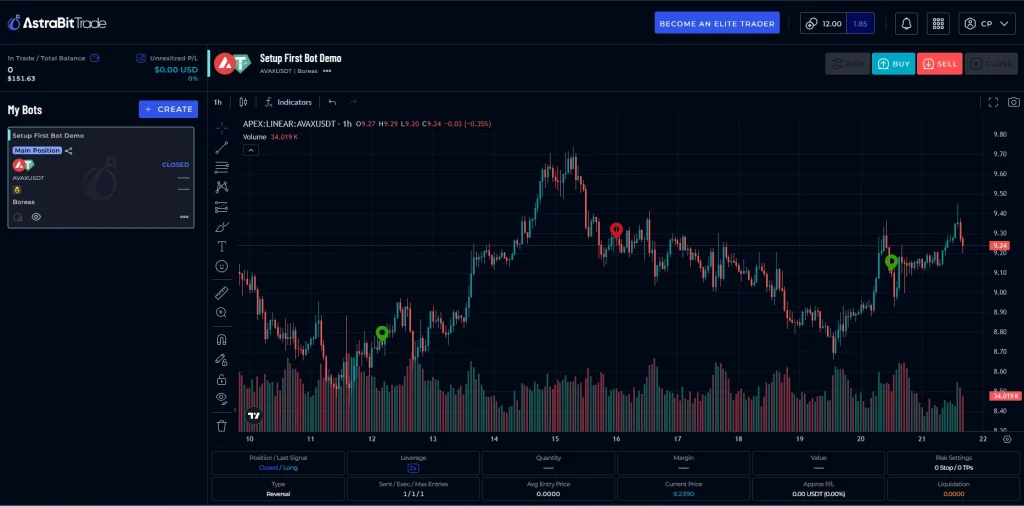
Finalize & Launch
- Review your bot configuration settings.
- Click Confirm & Create.
- Your bot sends a test transaction.
- Once complete, you’re taken to the AstraBit Trade screen, where you’ll view your trading bot activity.
AstraBit Tips
After Launch
Exchange API Creation Guides
Step-by-step API setup for every supported exchange. Asterisk (*) = Freemium eligible.
FAQs
Frequently Asked Questions
What is a crypto trading bot on AstraBit?
A crypto trading bot on AstraBit is automated software that connects to your exchange via API and executes trades based on a strategy and settings you define, reducing the need for manual trading.
What do I need before setting up a crypto trading bot with AstraBit?
You need an AstraBit account, a supported exchange account, and API keys from that exchange with trading permissions enabled and withdrawals disabled for security.
How do I choose the right bot type (Basic, Standard, or Advanced)?
Start the bot creation wizard and review the details for Basic, Standard, and Advanced bots. Then select the option that best matches your experience level, risk tolerance, and desired features such as leverage or multiple take-profit levels.
How can I safely test my bot before committing more capital?
Begin with a small equity allocation, confirm the test transaction during setup, and monitor performance in the AstraBit Trade screen and Nexus dashboard before increasing allocation.
How do I know my bot is running correctly after launch?
Your bot will appear in the AstraBit Trade screen with live activity and performance metrics. Related widgets in the Nexus dashboard will also populate, indicating the bot is active unless you pause, stop, or modify its settings.
When will I start being charged for my trading bot?
Charges begin only after the bot executes its first trade. You can configure your bot and view estimated daily costs in advance, but billing does not start until trading activity begins. After the first trade, charges are applied daily until the bot is stopped or deleted.
Does AstraBit have custody of my funds?
No. AstraBit does not take custody of your funds. Your assets remain on your connected exchange, and bots operate through API access with permissions you control.
Can AstraBit trading bots be used on both centralized and decentralized exchanges?
Yes. AstraBit supports automated trading across both centralized exchanges (CEX) and select decentralized exchanges (DEX), allowing you to manage strategies across different environments from one platform.
Related Concepts
Good to Know
Your Bot, Your Rules
No Custody
Your assets remain on your connected exchange — AstraBit never holds your funds.
You Control Permissions
Bots operate through API access with permissions you grant and can revoke anytime.
No Guaranteed Outcomes
A bot follows rules; it does not guarantee performance. Trading digital assets involves substantial risk.
Need help along the way?
If you experience any problems, contact support by email or submit a ticket through Discord.